Difference between revisions of "VALT Keypad"
IVSWikiBlue (talk | contribs) (Created page with "{{Article - Manual | title = VALT Keypad | content = <onlyinclude> {{Flexbox - Text Right | right = The <b>VALT Keypad</b> is mounted inside or outside a room. Users enter...") |
IVSWikiBlue (talk | contribs) |
||
| Line 4: | Line 4: | ||
| right = | | right = | ||
The <b>VALT Keypad</b> is mounted inside or outside a room. Users enter a unique pin code that identifies them as the author of the recording and who the recording is shared with. Use the keypad to start, stop and pause recording. And add time-stamped markers to an active video recording, so you can jump to key moments in video playback. | The <b>VALT Keypad</b> is mounted inside or outside a room. Users enter a unique pin code that identifies them as the author of the recording and who the recording is shared with. Use the keypad to start, stop and pause recording. And add time-stamped markers to an active video recording, so you can jump to key moments in video playback. | ||
| − | + | </onlyinclude> | |
{{hr - 2}} | {{hr - 2}} | ||
| Line 21: | Line 21: | ||
{{img - no click | width = 270px | file = Keypad-3.png}} | {{img - no click | width = 270px | file = Keypad-3.png}} | ||
}} | }} | ||
| − | |||
}} | }} | ||
Revision as of 09:17, 24 February 2026
Contents
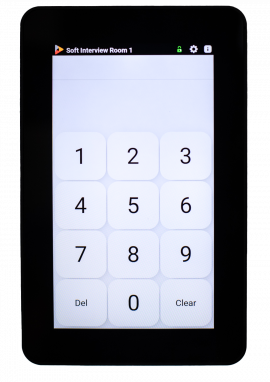
The VALT Keypad is mounted inside or outside a room. Users enter a unique pin code that identifies them as the author of the recording and who the recording is shared with. Use the keypad to start, stop and pause recording. And add time-stamped markers to an active video recording, so you can jump to key moments in video playback.
Product Dimensions & Specs
- Model Name: VALTKP
- Screen Size: 5”
- Screen Resolution: 1280x720
- Touch Screen Type: Capacitive 10-point Multitouch
- Processor Speed: 1.2GHZ
- RAM: 1GB
- Network Connectivity: RJ45
- Power: POE 802.3AF
- Weight: 200G
